Microsoft Security Copilot: Security Architecture, Shared Responsibility, and Governance Considerations
Key Takeaways
- Microsoft secures the Security Copilot SaaS platform, including the underlying infrastructure, model hosting and platform-level safeguards.
- Customers remain responsible for their own environment, including identities, permissions, configurations, data governance and how Security Copilot is used.
- Least privilege should be a core design principle, especially for users and roles that can access sensitive security data through plugins.
- Privileged Identity Management should be used to control and monitor roles that inherit or grant administrative access to Security Copilot.
- Conditional Access and MFA should be enforced to reduce the risk of unauthorised access.
- Data-sharing settings should be carefully governed, with opt-in decisions documented and aligned to privacy, compliance and risk requirements.
- Audit logging should be enabled and monitored to support investigation, compliance and detection of misuse.
- Plugin governance is essential, as Security Copilot can only access data through enabled plugins and the signed-in user’s permissions.
- Responsible AI controls should be embedded into operating procedures, including analyst validation of AI-generated outputs before action.
What is Microsoft Security Copilot?
Microsoft Security Copilot is a generative AI-powered security solution that helps defenders increase efficiency and capability to improve security outcomes at machine speed and scale. It provides a natural-language assistive experience for security professionals across end-to-end scenarios including incident response, threat hunting, intelligence gathering, posture management, IT troubleshooting, security policy management, secure lifecycle workflow configuration, and stakeholder reporting.
Capacity is consumed in Security Compute Units (SCUs), provisioned per Workspace and tracked in the usage monitoring dashboard.
What is the Shared Responsibility Model?
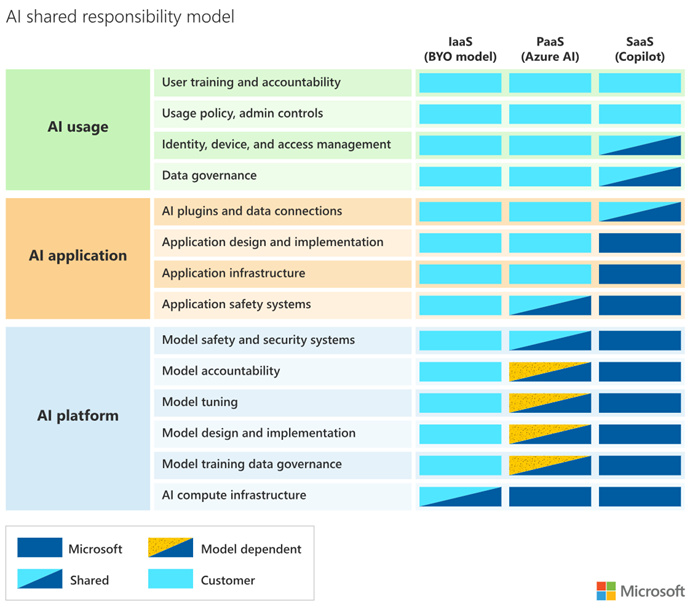
Microsoft Security Copilot is delivered as a SaaS offering. As such, the workload owner (the customer) and the cloud provider (Microsoft) share security responsibilities . As a SaaS service, Microsoft is responsible for physical datacentre security, physical hosts, physical network, the operating system, network controls, and the AI model hosting and platform-level safeguards. The organisation always retains responsibility for customer data, configurations and settings, identities and users, and access management.
Microsoft adds an explicit AI overlay to the standard responsibility matrix. Microsoft is responsible for securing the AI infrastructure, model hosting, and platform-level safeguards. Customers remain accountable for how AI is applied within their environment, including protecting sensitive data, managing prompt security, mitigating prompt injection risks, and ensuring compliance with organisational and regulatory requirements.
Security Architecture Overview
How is Microsoft Security Copilot Architected?
Security Copilot architecture comprises four layers: the user interface, the orchestration and grounding layer that pre- and post-processes prompts, the Microsoft and third-party plugins that supply contextual data and the foundation model layer built on Azure OpenAI Service.
How Does Microsoft Security Copilot Isolate Tenant Data?
Security Copilot enforces tenant-level logical isolation. Each customer’s prompts, responses, pinned items, file uploads, and account data are stored and processed in a Workspace tied to a specific Azure storage location chosen at workspace creation. Once a Workspace’s data storage location is chosen, it cannot be changed.
By default, no human Microsoft user has access to the runtime database; network access is restricted to the private network where the Microsoft Copilot application is deployed. If a Microsoft engineer requires access for incident response, elevated access and network access must be approved by authorised Microsoft employees. Microsoft has performed penetration testing of these boundaries.
Two important boundary notes apply to UK customers. Microsoft states that “all Microsoft Security Services are out of scope for EU data residency requirements and Security Copilot won’t be listed as an EUDB service.” However, “if a customer provisions their tenant in the EU and isn’t opted in to data sharing, all Customer Data and pseudonymised personal data are stored at rest within the EU.” If data sharing is opted in, prompts can be stored outside the EU Data Boundary.
Identity and Access Management
How Does Microsoft Security Copilot Handle Authentication?
Security Copilot uses Microsoft Entra ID as its identity provider. Authentication to the platform is performed using standard Microsoft Entra mechanisms (OAuth 2.0, OpenID Connect, or SAML depending on integration), with Entra acting as the foundational cloud identity and access management service.
Security Copilot uses on-behalf-of (OBO) authentication to access security-related data through active Microsoft plugins. This means the platform never has elevated privileges beyond the signed-in user.
What Roles Are Available in Microsoft Security Copilot?
Security Copilot introduces two distinct platform roles: Copilot Owner and Copilot Contributor. These are not Microsoft Entra ID roles but instead are defined and managed within Security Copilot itself and only grant access to Security Copilot platform features.
- Copilot Owner
- Full administrative rights on Copilot Workspace
- Copilot Contributor
- Can create sessions, run promptbooks, manage personal promptbooks and upload files.
- This role cannot manage capacity, change tenant data-sharing settings, or change plugin availability.
To prevent accidental loss of administrative control, Security Copilot always enforces retention of two Owners.
The following Microsoft Entra and Microsoft Purview roles automatically inherit Copilot Owner access:
- Microsoft Entra: Billing Administrator, Compliance Administrator, Global Administrator, Intune Administrator, Security Administrator.
- Microsoft Purview: Compliance Administrator, Data Governance Administrator, Organisation Management.
For SCU capacity provisioning the user will require Azure Contributor or Owner role on the subscription or resource group in addition to Security Administrator or higher in the tenant.
How Should Privileged Access Be Managed in Microsoft Security Copilot?
Microsoft Entra Privileged Identity Management (PIM) provides time-based and approval-based role activation to mitigate the risks of excessive, unnecessary, or misused access permissions.
PIM is the recommended control for any role that auto-inherits Copilot Owner.
Key PIM capabilities applicable to Security Copilot privileged role governance:
- Just-in-time (JIT) privileged access for Microsoft Entra and Azure resources.
- Time-bound role assignments with start and end dates.
- Approval workflow before role activation.
- Mandatory MFA on activation.
- Justification field captured at activation.
- Notifications when privileged roles are activated.
- Access reviews integrated to confirm continued role need.
- Downloadable audit history for internal and external audit.
- Protection against removal of the last active Global Administrator and Privileged Role Administrator.
The roles recommended for PIM in line with this recommendation are:
- Billing Administrator
- Entra Compliance Administrator
- Global Administrator
- Intune Administrator
- Security Administrator
- Azure Contributor
- Owner
- Purview Compliance Administrator
- Purview Data Governance Administrator
- Purview Organization Management
How Should Conditional Access and MFA be Applied to Microsoft Security Copilot?
Microsoft Entra Conditional Access is a Zero Trust policy engine. It evaluates signals and enforces decisions on access. Conditional Access policies are enforced after first-factor authentication.
Microsoft’s official guidance for AI services like Security Copilot is to apply a Conditional Access policy by following the recommendation to target all resources. For organisations that prefer to target Security Copilot directly, Microsoft publishes the four service principal IDs that represent the platform:
- Security Copilot Agent Management
- 43d7b169-1d9e-4d32-8cd8-06c5974ed90c
- Security Copilot Portal
- bb5ffd56-39eb-458c-a53a-775ba21277da
- Security Copilot API
- bb3d68c2-d09e-4455-94a0-e323996dbaa3
- Security Copilot Logic Apps Connector
- b0cf1501-8e0f-4fbb-b70a-52ca5ea7bda6
Data Security and Privacy
How Does Microsoft Security Copilot Access Data and Enforce Permissions?
Security Copilot draws context exclusively through plugins. The foundation of the permissions model is that Security Copilot runs queries as the user and as a result it never has elevated privileges beyond those the user has.
For each Microsoft plugin, the user must hold the appropriate service-specific RBAC role to retrieve data from that source.
- Examples documented by Microsoft include:
- Microsoft Sentinel Reader role for the Sentinel plugin
- Endpoint Security Manager role for the Intune plugin
Microsoft 365 services only allow Security Copilot to access Microsoft 365 services data processed by Microsoft Purview, and Customer Data generated by Microsoft Purview.
The full set of Microsoft Purview data types accessible by Security Copilot is:
- Microsoft Purview Data Loss Prevention
- DLP alert data associated with a DLP match.
- Microsoft Purview Information Protection
- Activity logs associated with labelling activity.
- eDiscovery
- Data captured within a review set of an eDiscovery search.
- Insider Risk Management
- IRM alert data associated with an IRM policy alert.
- Communication Compliance
- Data captured within a policy match of a Communication Compliance Policy.
- Data Security Posture Management
- Activity and alerts data associated with MIP, DLP, and IRM.
How Does Microsoft Secuity Copilot Handle Prompts and Responses?
Microsoft defines Customer Data in Security Copilot as the prompts users submit to Security Copilot, the information retrieved to generate responses, the responses themselves, the content of pinned items, and any file uploads.
Two data-sharing toggles are controlled by a Copilot Owner within the environment which:
- Allow Microsoft to capture data from Security Copilot to validate product performance using human review.
- This is used to validate Copilot’s ability to respond, understand task patterns, produce metrics, and improve plugin and agent responses.
- Allow Microsoft to capture and human-review data from Security Copilot to build and validate Microsoft’s security AI model.
- This is used to develop security-specific models built on top of the Azure OpenAI foundational model.
Microsoft is explicit in stating that data is not shared with OpenAI or used to train the Azure OpenAI foundational model. If data sharing is turned on, prompts may be human-reviewed and may be stored outside the Workspace geography for 90 days. If it is turned off, no further sharing occurs and any previously shared data is purged within 180 days. File uploads are only available to the user who uploaded them; if file content is part of a retrieval that produces a response, that retrieved content can be stored outside the Workspace if data sharing is on.
Azure OpenAI abuse monitoring is disabled service-wide for Security Copilot, per the Data and Compliance FAQ.
The general recommendation is to turn both data-sharing toggles off unless a documented business decision exists to opt in.
Integration Security
What Microsoft Security Tool Integrate with Microsoft Security Copilot/
Security Copilot integrates with the Microsoft security portfolio through embedded experiences inside each product’s portal. Each embedded experience is a Copilot sidecar that respects Security Copilot RBAC plus the underlying product’s RBAC.
Documented embedded experiences include the following:
- Microsoft Defender XDR
- File analysis, script and code analysis, incident report creation, KQL hunting query generation, device summarisation, incident summarisation, identity summarisation and guided response.
- Microsoft Sentinel
- Incident summarisation.
- Microsoft Intune
- Device query, policy and setting management and device troubleshooting using Copilot.
- Microsoft Entra
- App risk investigation, incident investigation, risky user investigation and lifecycle workflow management.
- Microsoft Purview
- DLP alert investigation, IRM activity investigation, Communication Compliance message summarisation and eDiscovery message summarisation.
- Microsoft Defender for Cloud
- Analyse, delegate, remediate and summarise recommendations.
- Microsoft Defender Threat Intelligence
- Threat intelligence enrichment.
Embedded experiences consume from the same SCU pool as the standalone portal.
How Should Microsoft Security Copilot APIs and Connectors Be Secured?
Security Copilot leverages four service principals. All four of these are covered in the Conditional section above however this section focuses on the two API connections below.
Of these, the Security Copilot API (bb3d68c2-d09e-4455-94a0-e323996dbaa3) and the Security Copilot Logic Apps Connector (b0cf1501-8e0f-4fbb-b70a-52ca5ea7bda6) are the most relevant to programmatic and automated workflows. Both are Entra-registered enterprise applications and are therefore subject to Conditional Access targeting.
Microsoft’s general API guidance for Microsoft Defender APIs is to use Microsoft Entra registered applications with least-privilege application permissions, certificate-based authentication where possible, and Conditional Access restrictions. The same guidance applies to any custom application that calls Security Copilot APIs.
What Audit Logs Are Available for Microsoft Security Copilot?
Security Copilot exposes audit data through three integrated channels:
- Microsoft Purview Unified Audit Log (UAL)
- Administrator events and activity metadata.
- Microsoft Purview Data Security Posture Management (DSPM) for AI
- Prompt and response pair content.
- Office 365 Management Activity API
- Programmatic and SIEM ingestion, for example into Microsoft Sentinel.
To enable Security Copilot for Purview Audit and DSPM for AI, a Security Administrator must opt in either at first-run or through the Owner settings.
Threat Protection and Abuse Prevention
How Should Microsoft Security Copilot Be Monitored?
Security Copilot is monitored as a workload by sending audit logs to a SIEM. Microsoft recommends ingesting Security Copilot audit logs into Microsoft Sentinel for unified detection.
The combination of Microsoft Purview UAL admin events plus DSPM for AI content events allows detection of:
- Unusual, privileged configuration changes
- Agent triggers, plugin publication, data-sharing toggle changes.
- Prompt patterns associated with potential data exfiltration.
- Spikes in SCU consumption from a single account.
- Cross-tenant access via GDAP or Azure Lighthouse.
- Plugin error patterns that might indicate misconfiguration or abuse.
How Can Organisations Detect Misuse of Microsoft Security Copilot?
Microsoft Purview Insider Risk Management (IRM) correlates signals across Microsoft 365 services and third-party connectors to identify malicious or inadvertent insider risks.
Available policy templates relevant to Copilot adoption include:
- Data theft by departing users.
- Data leaks, data leaks by priority users, data leaks by risky users.
- Security policy violations.
- Risky AI usage.
- Risky Agents.
- Risky browser usage (preview).
The Risky AI usage and Risky Agents templates are the two directly relevant for Security Copilot governance.
They allow an organisation to detect when Copilot users or agents act in ways that deviate from baseline.
What Responsible AI Controls Should Be Applied to Microsoft Security Copilot?
Microsoft's Responsible AI approach is guided by six core principles:
- Fairness
- Reliability and safety
- Privacy and security
- Inclusiveness
- Transparency
- Accountability
Customer-side Responsible AI considerations include the following:
- Train analysts to validate Copilot output before acting, especially for generated code or KQL queries.
- Use the in-product feedback as part of the SOC review cycle.
- Treat agents as their own identity principals
- Assign agents the minimum required plugins and review them regularly.
- Document AI-augmented decisions for audit traceability.

Mike Bennett
Senior Cloud Consultant
 Blogs
Blogs
 Blogs
Blogs

.tmb-6_col_resi.jpg?sfvrsn=1e1e9e4b_1)