From Teams Impersonation to Edgecution
On 22 October 2026, Bridewell investigated an unsolicited Microsoft Teams support message that led to malware execution on one customer endpoint. The customer operates in the US Energy sector. The subsequent activity included a fake system update, archive extraction into an Edge profile, Python archive staging and attempted removal of the downloaded executable. We assess with Moderate confidence that this sequence is consistent with the deployment workflow described in Zscaler's Edgecution reporting associated with an initial access broker linked to Payouts King.
Who is Payouts King?
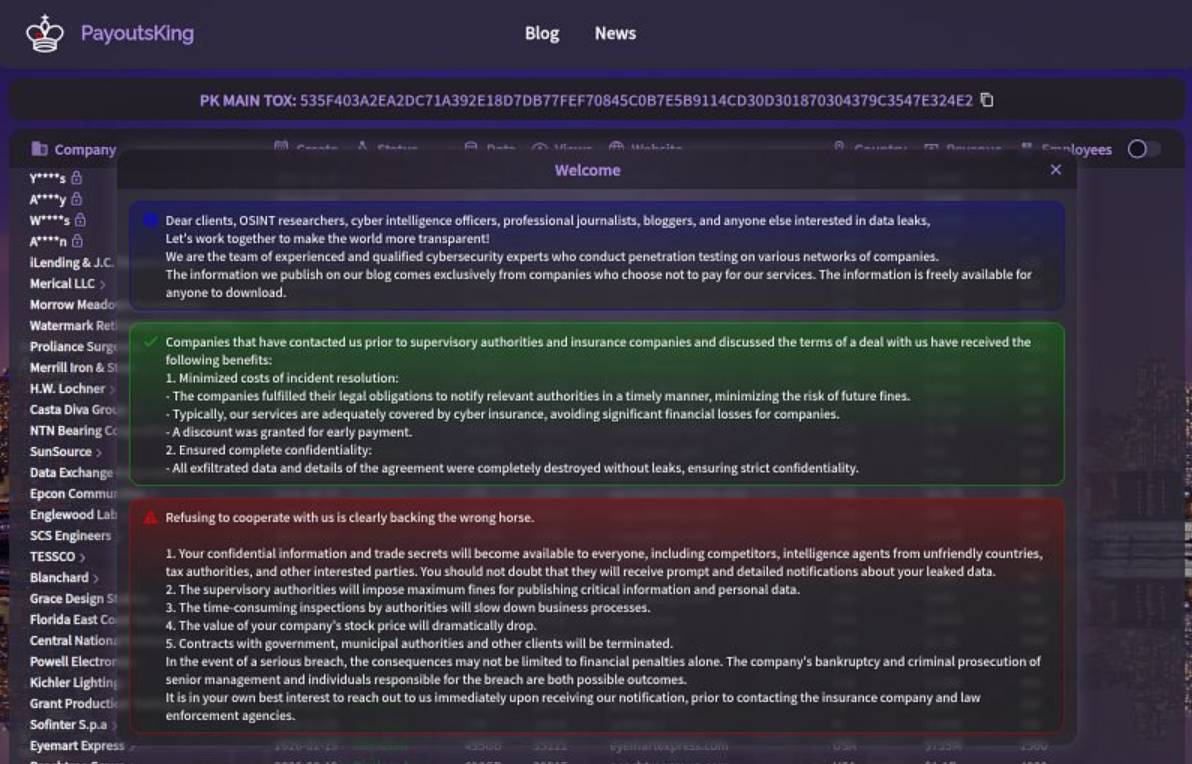
Figure 1. Payouts King data-leak site and extortion messaging.
In April 2026, Zscaler reported activity consistent with former Black Basta initial access brokers, including spam bombing, Teams impersonation and Quick Assist abuse, and attributed some attacks to Payouts King with high confidence. Its June research described Edgecution deployment by a broker associated with the group.
The supplied Ransomware.live snapshot lists 117 Payouts King victim records across 11 countries, with an earliest estimated attack date of 17 April 2025 and a last-seen date of 24 October 2026. Its attack-velocity chart, which uses estimated attack dates where available, shows a concentration in January-April 2026, followed by lower monthly counts through October, with a smaller rise in August. These are records associated with the group's victim claims, rather than an independently confirmed count of attacks.
In the separately supplied sector snapshot, Manufacturing had the most classified victim claims (26), followed by Professional Services (11), Technology (10) and Healthcare (7); Energy & Utilities accounted for three. A further 41 records lacked a sector classification. The sector snapshot totals 113 records, so its figures are not treated as a complete breakdown of the 117-record group-profile snapshot.
Observed and assessed attack chain
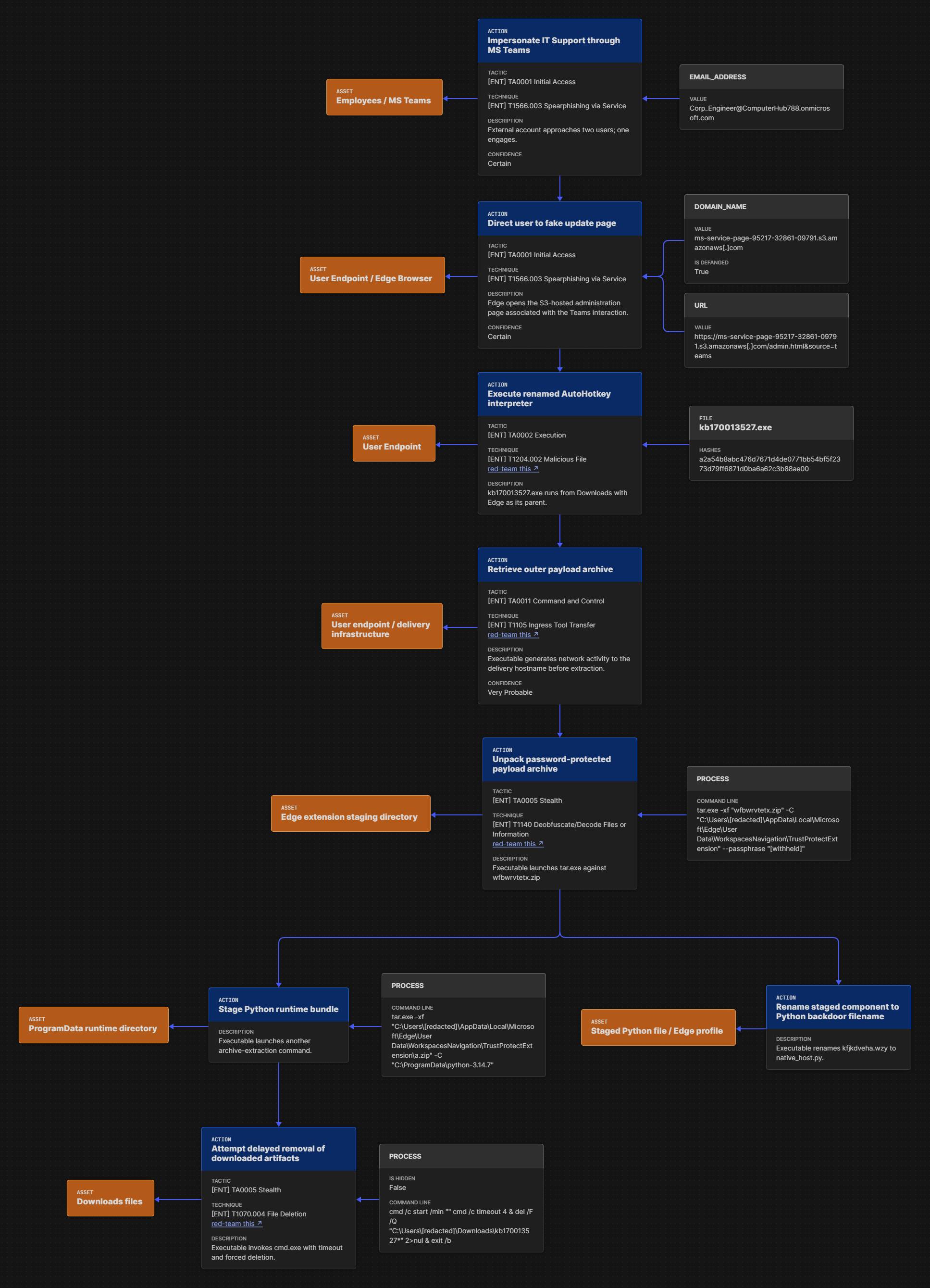
Figure 2. Observed and assessed deployment sequence in the 22 October 2026 incident.
From Fake IT Support to AutoHotkey Execution
The incident began when an external account Corp_Engineer@ComputerHub788.onmicrosoft.com approached two users through Microsoft Teams using an IT-support-style identity. One user engaged and subsequently executed malware on one endpoint.
"msedge.exe" --edge-skip-compat-layer-relaunch
                                                        --single-argument
                                                        microsoft-edge:///?url=https%3a%2f%2fms-service-page-95217-32861-09791.s3.amazonaws[.]com%2fadmin.html&source=teams
"msedge.exe" --single-argument
                                                        microsoft-edge:///?url=https%3a%2f%2fms-service-page-95217-32861-09791.s3.amazonaws[.]com%2fadmin.html&source=teams.html&source=teams
S3 lure launch
DeviceProcessEvents
| where InitiatingProcessFileName in~ ("msedge.exe", "ms-teams.exe")
| extend DecodedCommandLine = url_decode(ProcessCommandLine)
| extend LaunchUrl = extract(@"(?i)(https?://[^\s""<>]+)", 1, DecodedCommandLine)
| where LaunchUrl contains "ms-service-page"
| where LaunchUrl endswith "admin.html&source=teams"
| project
    Timestamp, DeviceId, DeviceName, ReportId, AccountName,
    FileName, ProcessCommandLine, LaunchUrl, ProcessId,
    InitiatingProcessFileName, InitiatingProcessCommandLine
Process telemetry records
kb170013527.exe
executing from the user's Downloads directory, with
msedge.exe
as its initiating process. We identified it as a legitimate AutoHotkey executable renamed to
kb170013527.exe
to resemble a system update. Its version metadata identifies AutoHotkey 2.0.26 (AutoHotkey 64-bit). This places the executable's launch after the Teams lure and browser activity. No embedded script was identified in the executable, and no associated AutoHotkey script was recovered or identified.
Network telemetry records the executable generating a TCP/443 event to the same S3 hostname used by the lure page before the extraction commands. We assess with Moderate confidence that this AutoHotkey-based executable likely retrieved the outer ZIP payload from the S3 delivery infrastructure before launching
tar.exe
to extract it. The requested filename and transferred content were not visible in the network event.
AutoHotkey executable contacting S3 delivery infrastructure
DeviceNetworkEvents
| where InitiatingProcessVersionInfoProductName has "AutoHotkey"
| where RemoteUrl endswith "s3.amazonaws.com"
| where InitiatingProcessFolderPath matches regex @"(?i)\\downloads\\kb[^\\]*\.exe$"
| project
    Timestamp, DeviceId, DeviceName, ReportId, ActionType,
    InitiatingProcessAccountName,
    InitiatingProcessFileName, InitiatingProcessFolderPath,
    InitiatingProcessCommandLine, InitiatingProcessId,
    InitiatingProcessCreationTime,
    InitiatingProcessParentFileName,
    InitiatingProcessVersionInfoProductName,
    InitiatingProcessVersionInfoProductVersion,
    InitiatingProcessSHA1, InitiatingProcessSHA256,
    RemoteUrl, RemoteIP, RemotePort, Protocol
| order by Timestamp desc
The available evidence supports an AutoHotkey-based deployment route. Clipboard-based batch or PowerShell deployment, also described by Zscaler, was not established in this incident.
Edge AppKey writes
DeviceRegistryEvents
| where ActionType == "RegistryValueSet"
| where RegistryKey endswith @"\Software\Microsoft\Edge"
| where RegistryValueName =~ "AppKey"
| project
    Timestamp, DeviceId, DeviceName, ReportId,
    RegistryKey, RegistryValueName, RegistryValueType,
    RegistryValueData, PreviousRegistryValueData,
    InitiatingProcessAccountName,
    InitiatingProcessFileName, InitiatingProcessCommandLine
| order by Timestamp desc
Native-messaging registration
DeviceRegistryEvents
| where ActionType == "RegistryValueSet"
| where RegistryKey contains @"\Microsoft\Edge\NativeMessagingHosts\"
    or RegistryKey contains @"\Google\Chrome\NativeMessagingHosts\"
| project
    Timestamp, DeviceId, DeviceName, ReportId,
    RegistryKey, RegistryValueName, RegistryValueData,
    InitiatingProcessAccountName,
    InitiatingProcessFileName, InitiatingProcessCommandLine
| order by Timestamp desc
Scheduled-task persistence and headless Edge
Zscaler describes a scheduled task launching Edge in headless mode with the malicious extension and a separate Recovery profile.
Headless Edge with an extension
DeviceProcessEvents
| where FileName =~ "msedge.exe"
| where ProcessCommandLine has_all ("--load-extension", "--headless", "--user-data-dir")
| where ProcessCommandLine contains @"\Microsoft\Edge\User Data\Recovery"
Scheduled-task extension launch
DeviceProcessEvents
| where (FileName =~ "schtasks.exe"
    and (ProcessCommandLine contains "/create"
        or ProcessCommandLine contains "/change"))
    or (FileName in~ ("powershell.exe", "pwsh.exe")
    and (ProcessCommandLine contains "Register-ScheduledTask"
        or ProcessCommandLine contains "Set-ScheduledTask"))
| where ProcessCommandLine contains "msedge"
| where ProcessCommandLine contains "--load-extension"
| project
    Timestamp, DeviceId, DeviceName, ReportId,
    AccountName, FileName, ProcessCommandLine,
    InitiatingProcessFileName, InitiatingProcessCommandLine
| order by Timestamp desc
Native-host execution and command and control
Zscaler's Edgecution reporting describes a backdoor architecture in which a headless Edge extension communicates over WebSockets and relays commands to Python through native messaging. The queries below look for the Edge-to-command-shell-to-Python process chain, Python-launched shells and WebSocket C2 candidates.
Edge-to-Python Native-Host Execution
DeviceProcessEvents
| where FileName in~ ("python.exe", "pythonw.exe")
| where InitiatingProcessFileName =~ "cmd.exe"
| where InitiatingProcessParentFileName =~ "msedge.exe"
| extend
    HasNativeHostLauncher = InitiatingProcessCommandLine contains "native_host.bat",
    HasEdgeProfileScript = ProcessCommandLine contains @"\Microsoft\Edge\User Data\"
| project
    Timestamp, DeviceId, DeviceName, ReportId, AccountName,
    FileName, FolderPath, ProcessCommandLine,
    HasNativeHostLauncher, HasEdgeProfileScript,
    ProcessId, ProcessCreationTime,
    InitiatingProcessFileName, InitiatingProcessCommandLine,
    InitiatingProcessParentFileName
| order by Timestamp desc
Python shell execution
DeviceProcessEvents
| where FileName in~ ("cmd.exe", "powershell.exe", "pwsh.exe")
| where InitiatingProcessFileName in~ ("python.exe", "pythonw.exe")
| where InitiatingProcessCommandLine contains @"\Microsoft\Edge\User Data\"
    or InitiatingProcessCommandLine contains "native_host.py"
| project
    Timestamp, DeviceId, DeviceName, ReportId, AccountName,
    FileName, ProcessCommandLine, ProcessId, ProcessCreationTime,
    InitiatingProcessFileName, InitiatingProcessFolderPath,
    InitiatingProcessCommandLine, InitiatingProcessId,
    InitiatingProcessCreationTime
| order by Timestamp desc
Edgecution C2 candidates
DeviceNetworkEvents
| where RemoteUrl has "cloudfront.net"
    and RemoteUrl has "/ws"
    and (RemoteUrl startswith "wss://"
        or RemoteUrl contains "wss%3A%2F%2F")
| project
    Timestamp,
    DeviceId,
    DeviceName,
    ReportId,
    InitiatingProcessAccountName,
    InitiatingProcessFileName,
    InitiatingProcessCommandLine,
    RemoteUrl,
    RemoteIP,
    RemotePort,
    ActionType
| order by Timestamp desc
Into the Edge profile
Process telemetry confirms that
kb170013527.exe
initiated both
tar.exe
commands. The first attempts to extract
wfbwrvtetx.zip
into this directory beneath the user's Edge profile:
%LOCALAPPDATA%\Microsoft\Edge\User Data\WorkspacesNavigation\TrustProtectExtension
Tar.exe archive extraction
DeviceProcessEvents
| where FileName =~ "tar.exe"
| where ProcessCommandLine contains " -xf "
| where ProcessCommandLine contains @"\Microsoft\Edge\User Data\WorkspacesNavigation\TrustProtectExtension"
| where ProcessCommandLine contains " -C "
| where ProcessCommandLine contains "--passphrase"
| project
    Timestamp, DeviceId, DeviceName, ReportId, AccountName,
    FileName, ProcessCommandLine, ProcessId,
    InitiatingProcessFileName, InitiatingProcessCommandLine
The same executable then initiates a second
tar.exe
command, this time referencing
a.zip
within the extension staging tree and the extraction destination
C:\ProgramData\python-3.14.7.
The path name does not verify the installed runtime version or establish Python execution.
Python archive staging
DeviceProcessEvents
| where FileName =~ "tar.exe"
| where ProcessCommandLine contains " -xf "
| where ProcessCommandLine contains @"\Microsoft\Edge\User Data\WorkspacesNavigation\TrustProtectExtension\a.zip"
| where ProcessCommandLine contains " -C "
| where ProcessCommandLine contains @"C:\ProgramData\python-"
| project
    Timestamp, DeviceId, DeviceName, ReportId, AccountName,
    FileName, ProcessCommandLine, ProcessId,
    InitiatingProcessFileName, InitiatingProcessCommandLine
A
FileRenamed
event records
kb170013527.exe
renaming
kfjkdveha.wzy
to
native_host.py
within the extension staging directory. The resulting path was:
%LOCALAPPDATA%\Microsoft\Edge\User Data\WorkspacesNavigation\TrustProtectExtension\qyyrob\native_host.py
The Python component: a backdoor on the host
The significance of
native_host.py
is its assessed role as the host-side backdoor component. In Zscaler's report, the Edge extension communicates with the remote operator and forwards host commands to Python through native messaging. A setup-created
native_host.bat
launcher starts the Python backdoor, which exchanges requests and results with the extension over standard input and output. This gives the operator a route from the browser extension to operating-system actions.
The reported Python backdoor supports collecting system information, listing processes, writing files and executing shell commands, Python code and PowerShell. Zscaler describes an obfuscated Python script packaged within the encrypted deployment archive, alongside the extension and Python runtime; an
AppKey
registry value supplies its string-decryption key. These are reported capabilities, rather than actions established in our incident.
We assess with Moderate confidence that the archive supplied
kfjkdveha.wzy
within
TrustProtectExtension,
after which the renamed AutoHotkey executable changed it to
native_host.py.
The separate
a.zip
command targets the ProgramData Python directory. No subsequent backdoor execution or C2 communication was established.
Edge Native-Messaging Host File Staging
DeviceFileEvents
| where ActionType in ("FileCreated", "FileModified", "FileRenamed")
| where FolderPath contains @"\Microsoft\Edge\User Data\"
| where
    FileName =~ "native_host.bat"
    or FileName =~ "native_host.py"
    or (
        FolderPath contains @"\native"
        and (
            FileName endswith ".json"
            or FileName endswith ".py"
            or FileName endswith ".bat"
        )
    )
| project
    Timestamp, DeviceId, DeviceName, ReportId,
    ActionType, FileName, FolderPath, SHA1,
    InitiatingProcessAccountName,
    InitiatingProcessFileName, InitiatingProcessCommandLine
| order by Timestamp desc
Finally, the executable invoked a command combining a short delay with forced, quiet deletion of files matching
Downloads\kb170013527*.
The command records an attempted cleanup action; it does not establish that deletion succeeded.
cmd /c start /min "" cmd /c timeout 4 &
del /F /Q "C:\Users\ [redacted] \Downloads\kb170013527*" 2>nul &
exit /b
Delayed Cleanup of KB-Named Executables in Downloads
DeviceProcessEvents
| where FileName has "cmd.exe"
| where ProcessCommandLine has "timeout 4 & del"
| where ProcessCommandLine matches regex @"(?i)\\Downloads\\kb[0-9]+\*"
| project Timestamp, FileName, ProcessCommandLine
How our incident aligns with Edgecution
Zscaler describes Teams impersonation leading to a fake update site with AutoHotkey and clipboard-script deployment options. An encrypted ZIP with altered header bytes holds an embedded Python distribution, an extension and a native component. The setup repairs and extracts the archive, configures native messaging and schedules headless Edge. This supports the broad deployment comparison. In our incident, a renamed legitimate AutoHotkey executable was identified, but the associated script was not recovered.
In particular, Zscaler's example uses a
test1
staging directory and Python 3.13.3; this incident references
TrustProtectExtension
and a separate
a.zip
extraction to a Python-named ProgramData directory.
The overlap in this case rests on the support impersonation, AutoHotkey metadata, S3 delivery-infrastructure activity, Edge-profile staging, Python archive preparation and dropped native-host component. Those similarities support the Moderate-confidence assessment that the incident is consistent with the reported workflow. Scheduled-task creation, headless Edge execution,
AppKey
writes, successful C2 communication and Python command execution were not established in the incident.
Hunting for additional reported stages
The following stages were reported by Zscaler but were not established in our incident. We include corresponding hunt queries to help defenders investigate whether similar deployments progressed beyond the staging activity observed here. These queries cover AppKey configuration, native-messaging registration, extension persistence, native-host execution, Python-launched shells and C2 candidates.
Configuration and native-messaging registration
The reported deployment also includes archive preparation, an
AppKey
value under
HKCU\SOFTWARE\Microsoft\Edge
and native-host configuration. See
Zscaler's Edgecution analysis.
Infrastructure tracking adds context
Bridewell observed a recurring S3 bucket-name pattern:
ms-service-page-<five digits>-<five digits>-<five digits>
This pattern offers an infrastructure-discovery lead alongside endpoint investigation. The following 12 hostnames match the delivery naming pattern:
| Domain |
|---|
ms-service-page-11543-17831-11139.s3.amazonaws[.]com
|
ms-service-page-95217-32861-09791.s3.amazonaws[.]com
|
ms-service-page-75850-45485-20762.s3.us-east-1.amazonaws[.]com
|
ms-service-page-75850-45485-20762.s3.amazonaws[.]com
|
ms-service-page-05026-07997-95929.s3.amazonaws[.]com
|
ms-service-page-27446-81109-06346.s3.amazonaws[.]com
|
ms-service-page-32986-68367-25555.s3.amazonaws[.]com
|
ms-service-page-32877-97846-87437.s3.amazonaws[.]com
|
ms-service-page-02812-32002-28599.s3.amazonaws[.]com
|
ms-service-page-37166-13109-87410.s3.amazonaws[.]com
|
ms-service-page-80767-01412-22218.s3.amazonaws[.]com
|
ms-service-page-56617-86972-21652.s3.amazonaws[.]com
|
Python backdoor SHA-256 indicators
The following hashes are provided for retrospective hunting. The first is listed as a Python backdoor in Zscaler's Edgecution research; the remaining three were identified by Bridewell as Python backdoor indicators.
| SHA-256 | Source / context |
|---|---|
3d1158884fb339b3328bd330fcc27598e1f1c94bcac39e75d1a272afa4deee1a
| Zscaler-reported Edgecution Python backdoor. |
eaee8a8092a779dd68d7f411cee48212c61f325ceb9ad145107a9c0b4ca74b3b
| Analyst-supplied Python backdoor indicator; not independently verified. |
ad233fa4a6e64818b6d1d1bc537efd40c3d1c9b20cc3c0954981071c6048723d
| Analyst-supplied Python backdoor indicator; not independently verified. |
65f710a78986a79802da98425d4df4c02859949505fbb5a8490da36aad7a5edd
| Analyst-supplied Python backdoor indicator; not independently verified. |
Practical defensive priorities
The first opportunity is to interrupt the support pretext. Give users a trusted route to verify unsolicited IT requests, and review how external accounts can contact staff through Teams. A patch request received in chat should be checked against established support and software-distribution processes.
On endpoints, review policy for unapproved browser extensions and interpreters. Investigators should examine extension staging in user-writable directories, native-messaging manifests and registration, and scheduled-task actions that launch Edge with unusual extension arguments.
Network investigation should combine precise reported destinations with process context and available WebSocket visibility.
The most useful lesson from this incident is the connection between the social interaction and the endpoint artifacts. Following an apparent update into an Edge profile exposed a deployment pattern that warranted investigation across browser configuration, Python staging and native messaging. That gives defenders concrete places to look while keeping the case's confirmed observations separate from the wider backdoor capabilities.
How Bridewell can help
Bridewell's Cyber Threat Intelligence services help organisations turn threat research into practical detection and security decisions. Our team provides threat hunting, intrusion analysis and intelligence-led detection support, alongside monitoring for exposed credentials, dark-web activity and third-party threats. We work with your SOC to prioritise intelligence relevant to your organisation and develop hunting hypotheses and custom detection analytics.
To discuss how we can support your team, explore our Cyber Threat Intelligence services and speak to our experts.
MITRE ATT&CK mapping
The incident tables distinguish observations from assessed activity; the final table maps additional behaviours described by Zscaler.
| Technique | Behaviour | Evidence basis |
|---|---|---|
| T1566.003 - Spearphishing via Service | External Teams messages impersonating IT support. | Observed incident activity. |
| T1204.002 - Malicious File | User-assisted launch of the fake-update deployment executable. | Incident account and execution telemetry; the legitimate interpreter was used in the malicious workflow. |
| T1140 - Deobfuscate/Decode Files or Information | Password-protected payload archive unpacking into the Edge profile. | Extraction command observed; successful extraction is not independently established by the command alone. |
| T1059.003 - Windows Command Shell | cmd.exe invoked for delayed cleanup. | Process invocation observed; successful deletion not established. |
| T1070.004 - File Deletion | Delayed deletion command targeting KB-named Downloads files. | Attempt observed; successful deletion not established. |
Assessed technique in our incident
| Technique | Behaviour | Evidence basis |
|---|---|---|
| T1105 - Ingress Tool Transfer | Assessed retrieval of the outer ZIP by the AutoHotkey executable. | Moderate-confidence assessment from S3 network activity preceding extraction; transferred content was not visible. |
Additional techniques mapped from Zscaler's reporting
We checked the Edgecution article: it describes the behaviours below but does not explicitly list these ATT&CK IDs. The mappings are ours, not a technique list published by Zscaler. These stages or capabilities were not established in our incident.
| Our ATT&CK mapping | Supporting behaviour in the article | Article section |
|---|---|---|
| T1112 - Modify Registry | Setup writes the AppKey registry value. | Initial access & malware deployment |
| T1053.005 - Scheduled Task | Task launches headless Edge. | Initial access & malware deployment |
| T1176.001 - Browser Extensions | Malicious extension loaded by the scheduled launch. | Initial access & malware deployment |
| T1071.001 - Web Protocols | WebSocket C2. | Edgecution browser extension |
| T1059.003 - Windows Command Shell | Batch deployment, batch launcher and shell-command capability. | Deployment; command ID 107 |
| T1059.006 - Python | Python backdoor and Python-code execution. | Deployment; command ID 109 |
| T1059.001 - PowerShell | PowerShell deployment and command capability. | Deployment; command ID 111 |
| T1082 - System Information Discovery | System-information collection capability. | Command ID 106 |
| T1057 - Process Discovery | Process-listing capability. | Command ID 110 |
References
| Source | Contribution |
|---|---|
| Zscaler: Edgecution, cited as 23 June 2026 | Reported deployment workflow, backdoor architecture and broker association. |
| Zscaler: Payouts King ransomware, cited as 16 April 2026 | Separate ransomware analysis and historical context. |
| Ransomware.live: Payouts King, supplied screenshots; capture dates unspecified | Profile total, geographic reach, displayed date range, qualitative monthly pattern and separate sector counts; differing totals remain unreconciled. |

Joshua Penny
Senior Threat Intelligence Analyst
 Blogs
 Blogs